To use conda first download and install conda on your system. After the installation Open a terminal or command prompt on your system to create a new conda environment.
To create a new conda environment type:
conda create -na myenvName pythonVersion

# Acitivate
conda activate envName
When you install machine learning library on your environment and the installation was success but it did not work on your environment first thing to do is to make sure you select the right environment if yes, restart the environment and if it persist maybe you don’t have an activate environment.
To activate environment open your terminal and type
conda activate envNamethen check and see if it is active or not by typing the commands below.
echo $CONDA_DEFAULT_ENVconda info --envAll your environments will display on the terminal and the activate one will come with asterisk at the left of it. See Fig1
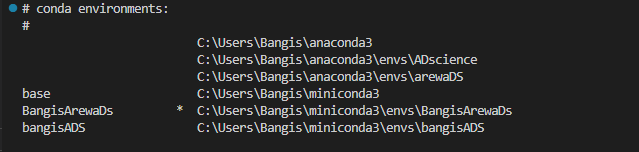
In case the asterisk is not there it mean you are not working on any active environment, and you need to initial your conda by running this command in your terminal.
conda initRestart terminal/cmd
and run
conda activete envNameThis work for me and I’m certain it would work for you.